


Choosing a blood pressure monitor for pregnancy starts with three checks: pregnancy-specific evidence that applies to the exact model, a cuff that fits your measured upper arm, and an automatic upper-arm design. Compare price and convenience features after those questions are settled.
“Validated” means that measurement accuracy has been assessed using a defined testing protocol. For a pregnancy purchase, check whether that assessment covers pregnant users and the model-and-cuff configuration you will actually use.
At a glance
- Choose an automatic upper-arm monitor with pregnancy-specific evidence for the exact model and a tested cuff that fits your measured arm.
- Match the retail model, pregnancy population, and supplied cuff to the supporting record. Ask for documentation if the retail and tested model names differ.
- Pregnancy validation provides evidence about measurement accuracy. Including participants with pregnancy-related hypertension and pre-eclampsia is an important part of that assessment.
- Compare everyday features afterward, and bring the purchased monitor to an appointment for a fit, technique, and readings check.
Start With Three Purchase Checks
1. Match the evidence to the exact model
Write down the full model name or number shown on the product page, box, or device label. Look for that identifier in a pregnancy-specific validation record or study.

Model-label example: the original label identifies FBP-A2. Use the identifier to look up the corresponding evidence; this photograph does not establish pregnancy validation.
This matters because one brand may sell several monitors, and related models may use different cuffs, sensors, or measurement software. Evidence for a product family or a similar-looking monitor does not automatically apply to the model in your cart.
The American Heart Association advises pregnant users to choose a monitor validated for them. A general-adult listing alone does not establish pregnancy-specific performance.
A different name in the study is a reason to investigate the connection. Some devices are sold under different model names, and validation lists may accept documented identical or equivalent models after review. STRIDE BP’s listing principles explain this process. Shared branding, appearance, or cuff range cannot establish that connection by themselves.
If the identifiers differ, ask the manufacturer for documentation connecting the retail model to the tested device, including the cuff configuration. Have your clinician or pharmacist help assess an unclear match. Terms such as “for moms” or “pregnancy-friendly” do not answer these questions.
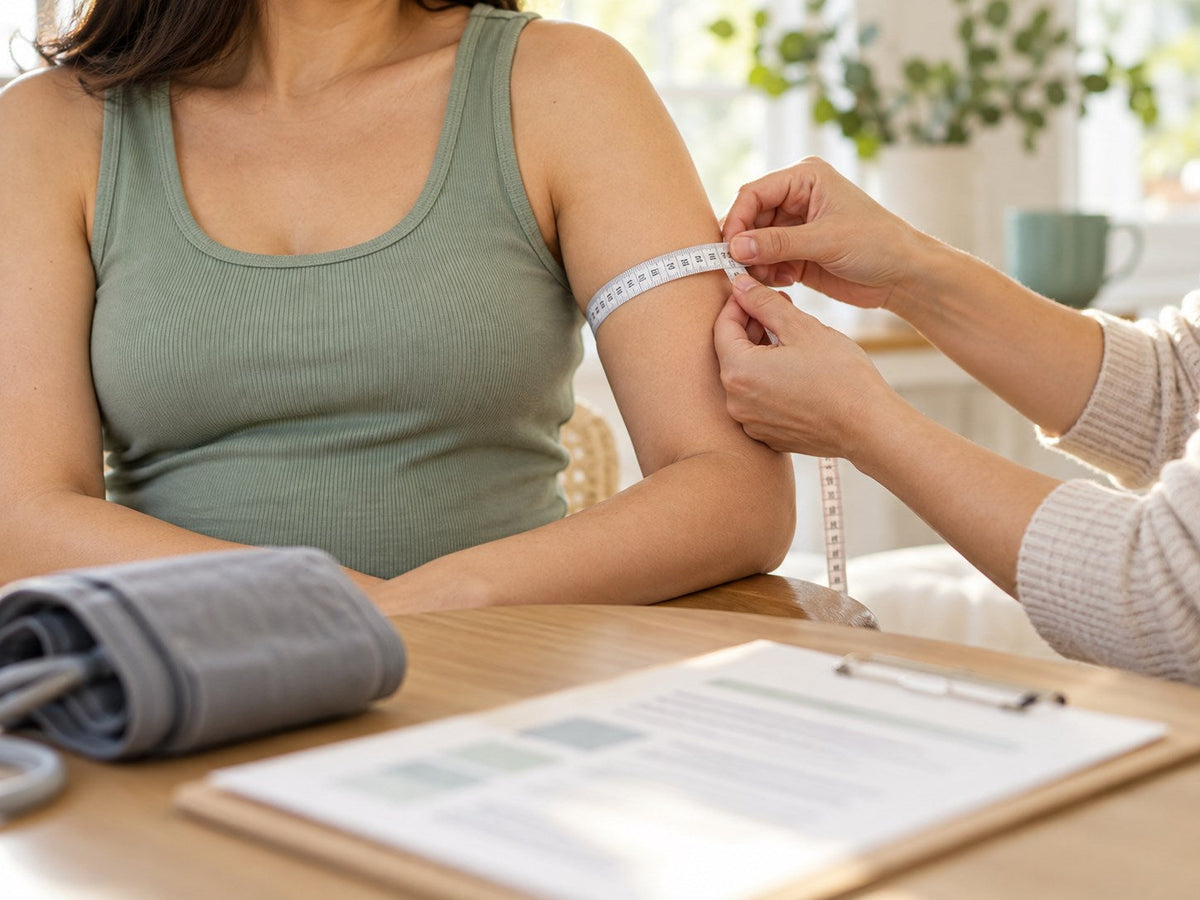
2. Measure your upper arm and check the cuff range
Measure around your upper arm and check that your measurement falls within the supplied cuff’s stated range. Follow the model’s fitting instructions; incorrect cuff size can affect accuracy. American Heart Association

Measure upper-arm circumference and check the size range of the cuff included with the monitor.
Check the cuff included in the package you are buying. A product family may offer several cuff sizes, so confirm which configuration the pregnancy evidence covers before choosing a different cuff. A wider size range is useful only if it both fits your arm and has evidence appropriate to your intended use.
If you cannot find a suitable combination of pregnancy evidence and cuff fit, ask your care team or pharmacist to help identify an alternative.
3. Choose an automatic upper-arm monitor
The AHA recommends an automatic, cuff-style upper-arm monitor for home use. Format, pregnancy evidence, and cuff fit remain separate checks. American Heart Association
A Pregnancy Validation Checklist You Can Use While Shopping
Save the supporting links or documents alongside the product details so you can review them with your care team.
| Check | What to confirm |
|---|---|
| Exact retail model | Record the full identifier on the listing and packaging. |
| Pregnancy population | Check that the evidence covers pregnancy and identify the participants included. |
| Tested cuff | Record the cuff and arm-circumference range; confirm that they match the configuration supplied with your purchase. |
| Model connection | If the retail and tested names differ, obtain documentation connecting the two configurations. |
| Testing method and conclusion | Identify the validation protocol and what the study concluded about measurement accuracy for pregnancy use. |
A product page can help you start this check; the underlying validation record supplies the evidence. If an answer is missing, ask for the relevant documentation. You do not need to interpret every statistical result yourself—a clinician or pharmacist can help you assess an unclear match.
What Pregnancy Validation Tells You
An accuracy study compares the monitor’s readings with reference blood pressure measurements under a defined protocol. Meeting the protocol’s criteria provides evidence that the tested monitor and cuff achieved the required accuracy in the pregnancy population assessed.
Including participants with pregnancy-related high blood pressure and pre-eclampsia is an important part of assessing a monitor for pregnancy use. STRIDE BP’s review criteria require those data when evaluating pregnancy validation. Their inclusion makes the evidence relevant to pregnancy circumstances that a study limited to people with normal blood pressure would not assess. STRIDE BP’s validation review criteria
This gives you a useful basis for choosing a monitor: evidence about its measurement performance in pregnancy, attached to a specific model and cuff. Correct fit and technique still matter when you use it at home.
Blood pressure readings also contribute to your maternity team’s assessment for pre-eclampsia, a pregnancy complication involving high blood pressure and other clinical findings. Your clinician considers the readings alongside symptoms and any additional tests needed to assess your health. CDC: High Blood Pressure During Pregnancy
Compare Everyday Features After Evidence and Fit
Once you have suitable options, compare the features that may make regular use easier:
- Memory can keep readings available between appointments.
- Separate user profiles can help keep two people’s records apart.
- App synchronization or export tools may make readings easier to organize or share.
- A readable display, simple controls, or voice guidance may make the device easier to operate.
Check how each feature works in the current instructions for the exact model. For example, confirm whether an app is optional, what information it stores, and how you can share a report. These are practical considerations for keeping records; assess measurement accuracy through the validation evidence.
Ask your care team what information they want recorded and what format they can review. Their answer can help you choose features that fit the monitoring plan you will follow.
FondCircle publishes this guide and sells the monitor shown below.
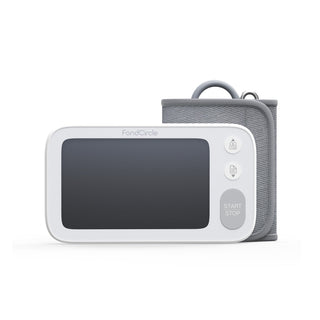
FondCircle FBP-A2
Use this model as a starting point for the checks above: compare the product details, exact model, supplied cuff and separate pregnancy-validation summary with your care team.
A home reading alone cannot diagnose preeclampsia. Follow your maternity team’s monitoring and urgent-care plan.
Before You Buy or Begin Monitoring
Before buying, confirm the retail model, its pregnancy evidence, and the supplied cuff’s fit. Resolve an unclear model or cuff connection with your care team or pharmacist.
After purchase, bring the monitor to an appointment for a technique check and comparison with office equipment, as the American Heart Association recommends.
Agree on a monitoring schedule and when to contact your maternity team about readings or symptoms. Keep attending prenatal appointments so home records remain part of your ongoing care. CDC pregnancy guidance

Share:
Blood Pressure and Preeclampsia: Why Trends Matter Even Before Symptoms
How to Check Blood Pressure at Home During Pregnancy